
Cerberus Testing - The Open Source Test Automation Framework
Antoine Craske, https://www.linkedin.com/in/acraske/, @acraske_
Cerberus Testing is an open source low-code test automation platform that supports testing Web, iOS, Android and API (REST, SOAP and Kafka) applications. The platform allows the creation of automated test cases through an easy to use web interface without any need for development skills. Thus automated tests implementation and management now becomes available for all elements of the development, quality and business teams.
Website: https://cerberus-testing.com
Version tested: 4.10 on macOS, Linux and Windows 32 or 64 bits
System requirements: A web browser, preferably Firefox or Chrome
License & Pricing: Free and open source under GNU GPL v3
Support: Documentation, videos, in-app tutorial, slack channel and GitHub tickets at https://github.com/cerberustesting/cerberus-source
Welcome to this Cerberus Testing step-by-step tutorial for web testing automation. This guide will help you understand the testing automation workflow and good practices for testing web applications. You will learn how to create your application under test, create, run and report on test cases.
The test we will implement will be to search information on the Google homepage. At the end of this article, you will be able to start expanding your test automation suite and perform Cross-Browser Testing. As Cerberus Testing is leveraging Selenium Webdriver, you can use this tutorial to implement your own test.
If you are new to Cerberus Testing, we recommend that you start by having a look at our GitHub page, website and overview video.
Prerequisites
The following elements are required in order to successfully complete this tutorial:
A Cerberus Testing instance in version 4.10 minimum, self-hosted or SaaS.
A Cerberus Testing account granted with a “Test” role.
A Cerberus Testing environment, by default “QA” and “UAT” are set up.
A Local or Remote Selenium Hub available with at least one web browser.
If you decided to implement your own Test, you need to secure the following points :
Access to your application under test. For a web application, this usually means a network access over HTTP or HTTPS, and a user account if you need to login.
The Test action and controls you want to perform, usually recorded with Selenium IDE, else with the selenium actions available previously.
If you have any questions on those prerequisites, explore our documentation, videos or contact your administrator. Feel free to interact with the community on our slack channel or submit a GitHub issue.
Step 1 — Create The Web Application
In this part, we create the Google application with its definition and technical specs. We will first create the application to then add its corresponding test environments.
1.1 Create the Main Application
The first step is to create the application that we will then use in our test case. This will enable us to reuse the same application definition across different tests, simplifying their maintenance. It involves defining the application name, description, typology and available environments.
(click on figure to enlarge)
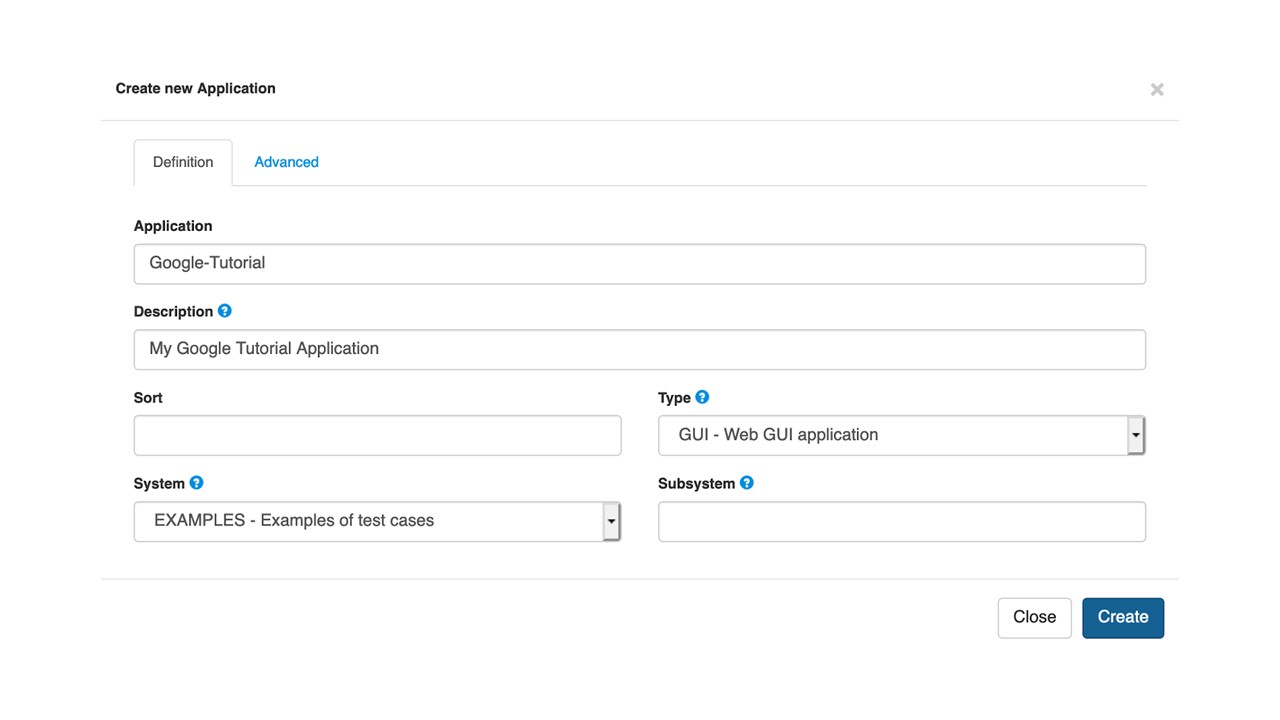
The following pop-up will appear with the necessary information to describe your application :
Application : This is your Application key, we recommend to use its common acronym, fill in “Google-Tutorial”
Description : Summarize here your application, in our case “My Google Tutorial Application”
System : Select the one linked to your application, here “EXAMPLES” is fine.
Type : Select “GUI - Web GUI application” for the test to be launched as a web test.
(click on figure to enlarge)
1.2 Add the corresponding environments
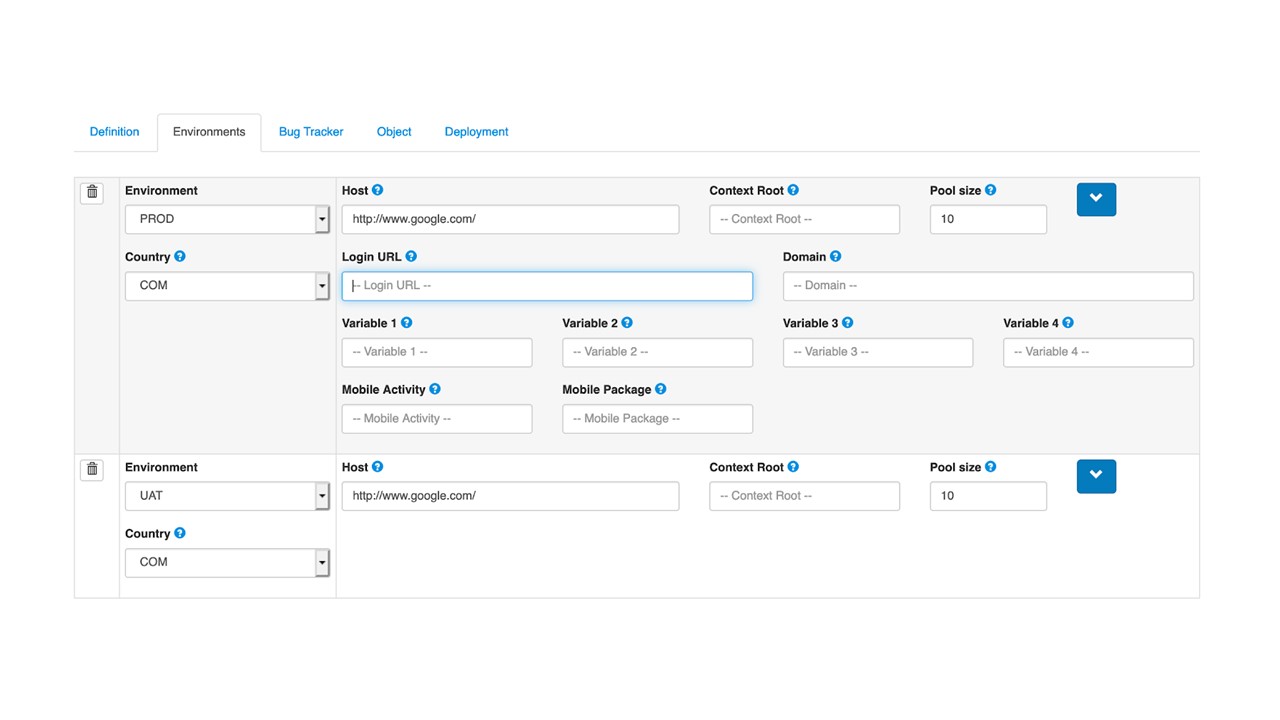
The final configuration defines the application environment with all the relevant information to reach your application under test. You can define here other environments for the same applications, which is useful when you want to expand your test suite.
An environment is composed by three elements :
Environment : Select here the test environment, in our case “UAT” (User Acceptance Testing)
Country : Select the specific country context, choose “COM”
Host : The Web application URL, in our case http://www.google.com
(click on figure to enlarge)
By expanding the menu, you can also define advanced settings such as your “Login URL”, enabling you to simplify your test action later on.
Step 2 — Create The Test Case
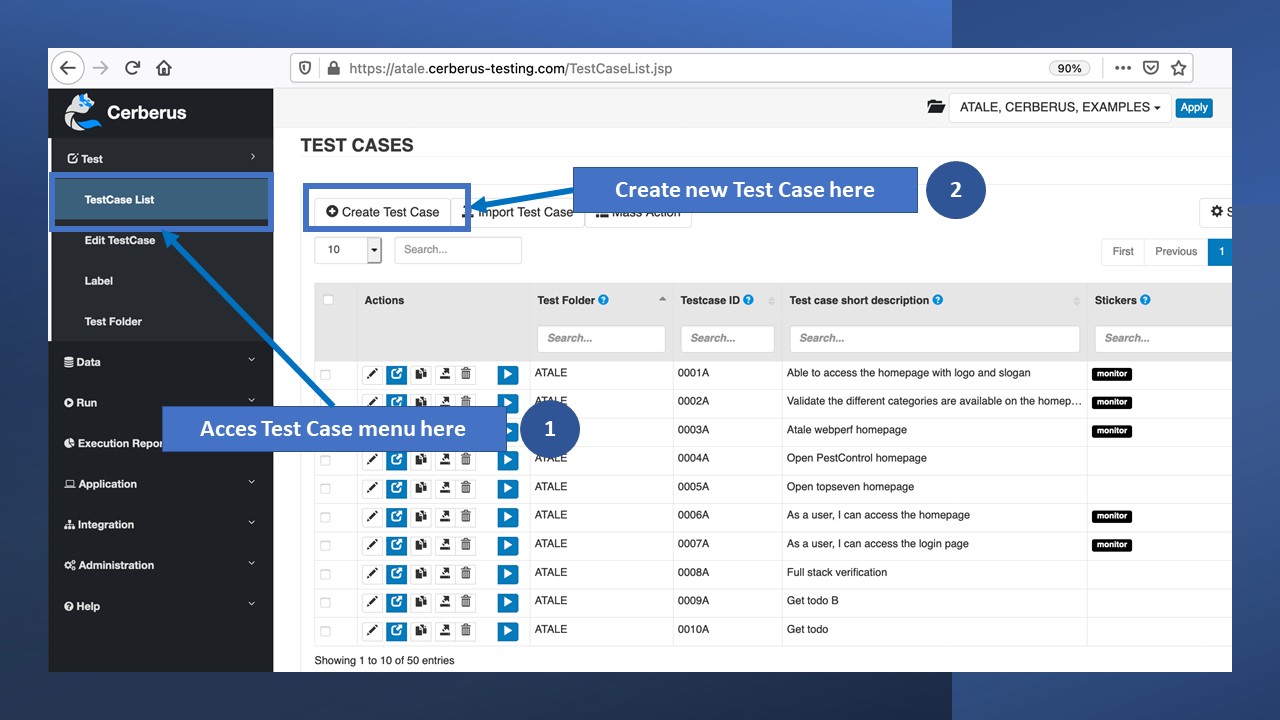
We will now build our test case to be run against the application we just created. In a similar way, we will access the required menu, define our test case content and share tips related to the test creation process.
(click on figure to enlarge)
Click on “Create Test Case” to display the creation pop-up, that we will fill with the required information :
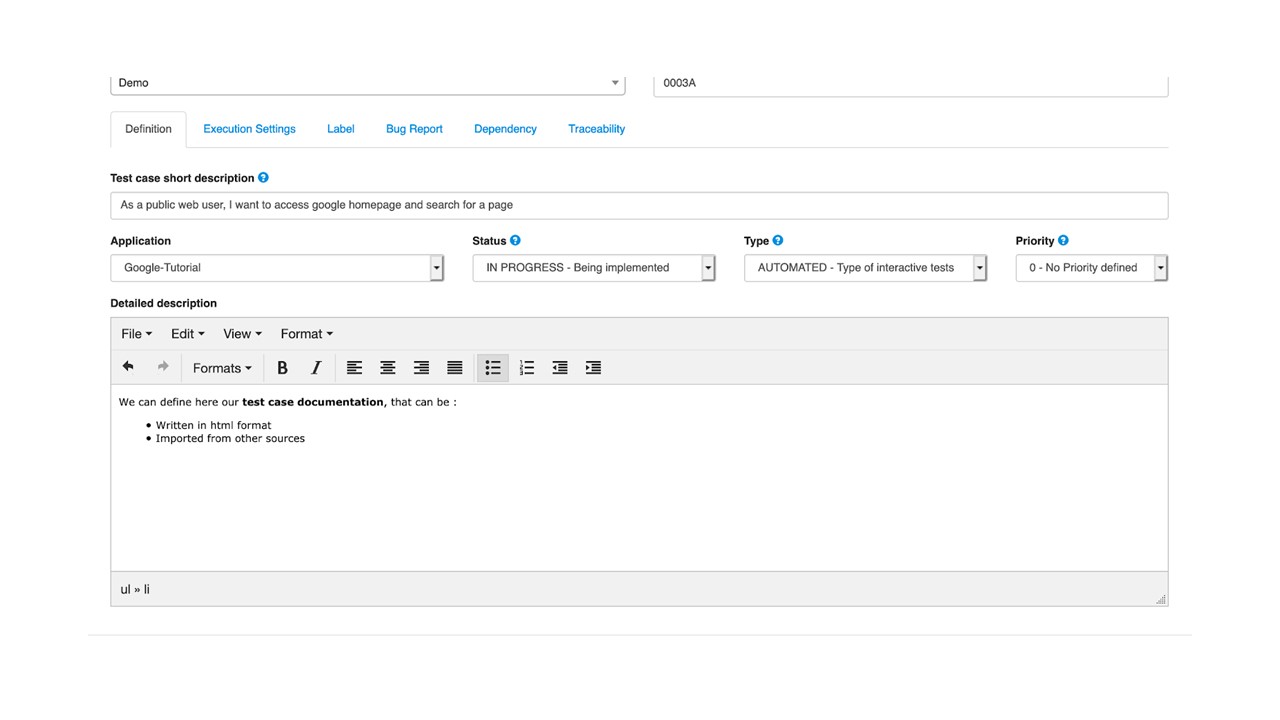
Test Folder : Select in which folder you want to keep your test cases, here choose “Demo”. The folders can be managed in the “Test / Test Folder” page.
Testcase ID : Enter your custom ID or leave the default generated one.
Test case short description : Enter the one-line description, usually in a use-case format “As a public web user, I want to access Google homepage and search for a page”
Application : The application under test, in our case “Google-Tutorial”
Status : The implementation state of your test case, in our example we will pass it to “IN PROGRESS”. For information, the status can be used as test execution criterias and a dashboard is available on the homepage.
Type : Select “AUTOMATED” to confirm that our test is to be an automated test. You can have manual or private tests we will not cover here.
Priority : Usually from 1 to 5, it can help you to prioritize your test implementation, reporting or go-nogo criterias for a campaign report. Leave it to “0 - No Priority defined”.
Detailed description (optional) : Use this box to enter your relevant use-case and test information. The format is in HTML so you can copy rich content. We leave some text as an example.
(click on figure to enlarge)
The other tabs are not necessary for now. A specific note: if you are creating your own test and want to run it in the ”PROD” test environment, you will need to activate this in the tab “Execution Settings” by checking the corresponding box.
Clicking on “Create”, you will confirm the test case creation. If you accept the default test case creation, a default test step will be created. In our case, we will follow a brand new creation process.
Step 3 — Define The Step, Action and Control
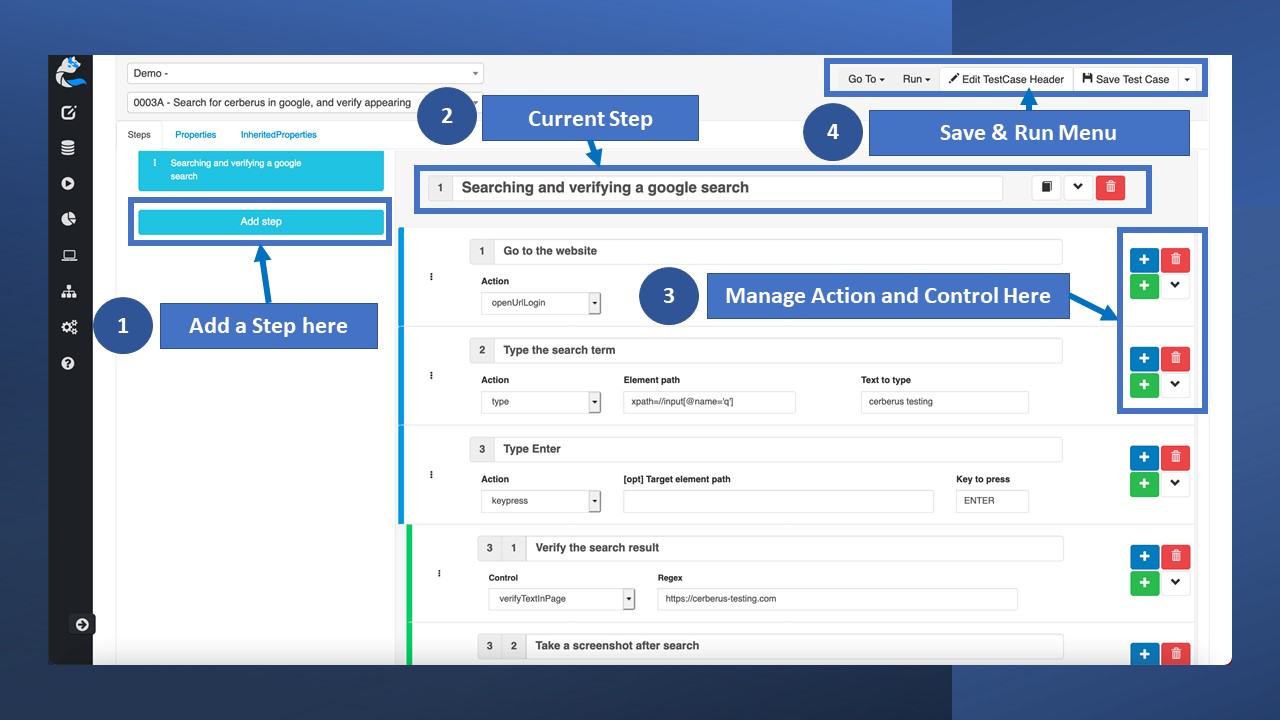
We can now configure the test case content using the low code library : Step, Action and Control. A Step is a collection of Action and Control for the main stages of your test. With a good design of those elements, you will be able to reuse them across tests to improve your test maintainability.
(click on figure to enlarge)
3.1 Add the Test Case Step
We can now add a step via the “Add Step” button and enter the corresponding description. Use clear descriptions in order to have a clear test readability with improved maintainability and reusability. You can name it “Searching and verifying a Google search”.
3.2 Add the Test Case Action and Controls
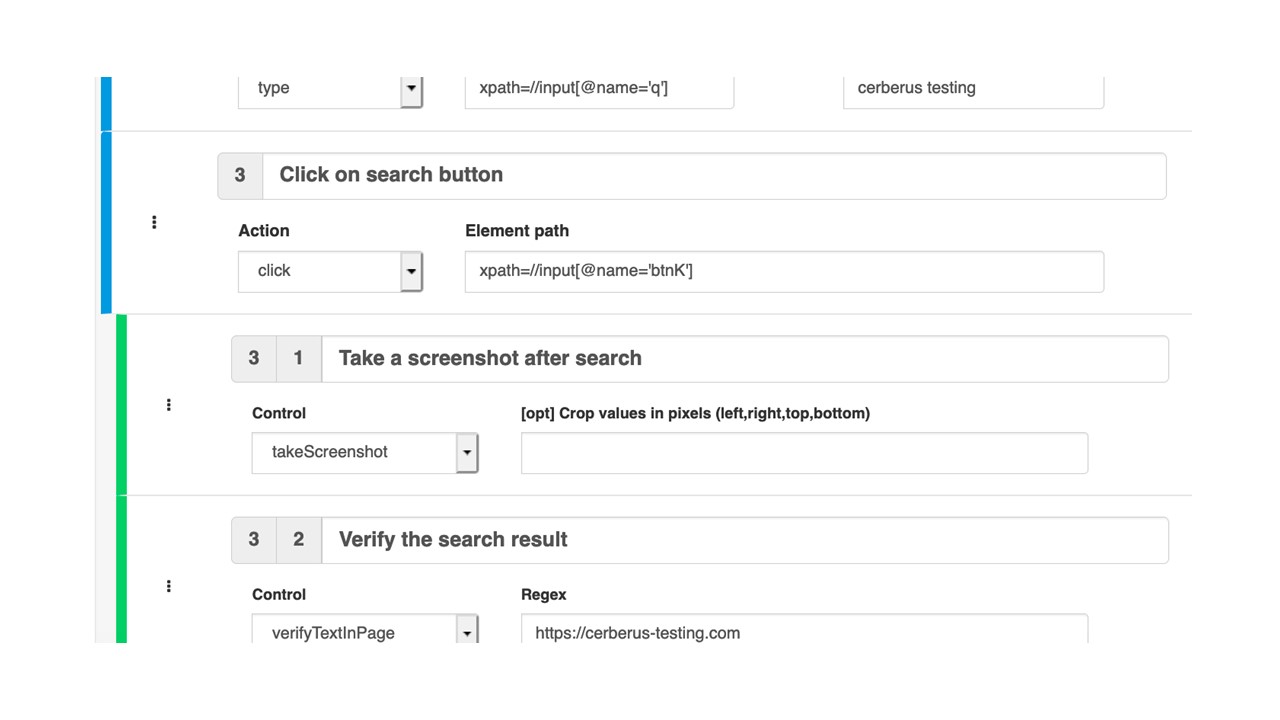
In this step we will detail the various actions and controls that should be performed during the tests. The commands are executed in their order of appearance.
(click on figure to enlarge)
We listed below the parameters that you can use:
Go to the website
Action openUrlLogin : Open the application login url set in the Application definition.
Please note that you need to start your Web test with one of the “open” actions for Cerberus Testing to know where to start.
Type the search term
Action type : Enter the corresponding text with the recognized element.
Element path xpath=//input[@name='q']
Text to type cerberus testing
Click on search button
Action click : Click on the recognized element.
Element path xpath=//input[@name='btnK']
Take a screen after search
Control takescreenshot : Will take a full web page screenshot, we defined it for stake of demonstration. They can be taken automatically at every action or only for errors for example.
Verify the search results
Control verifyTextInPage : In this case we will verify that the link https://cerberus-testing.com is present with the page. A lot of other controls are available and described in the documentation.
We confirm the changes by clicking on the “Save Test Case” button in the top right corner.
Step 4 — Run The Test Case
We are now ready to execute our test case! Navigate to the Run page by going to “Run / Run Test Case”. By default the other options are not available until you run the test once in a specific environment.
4.1 Launch the Test via the Run Test Page
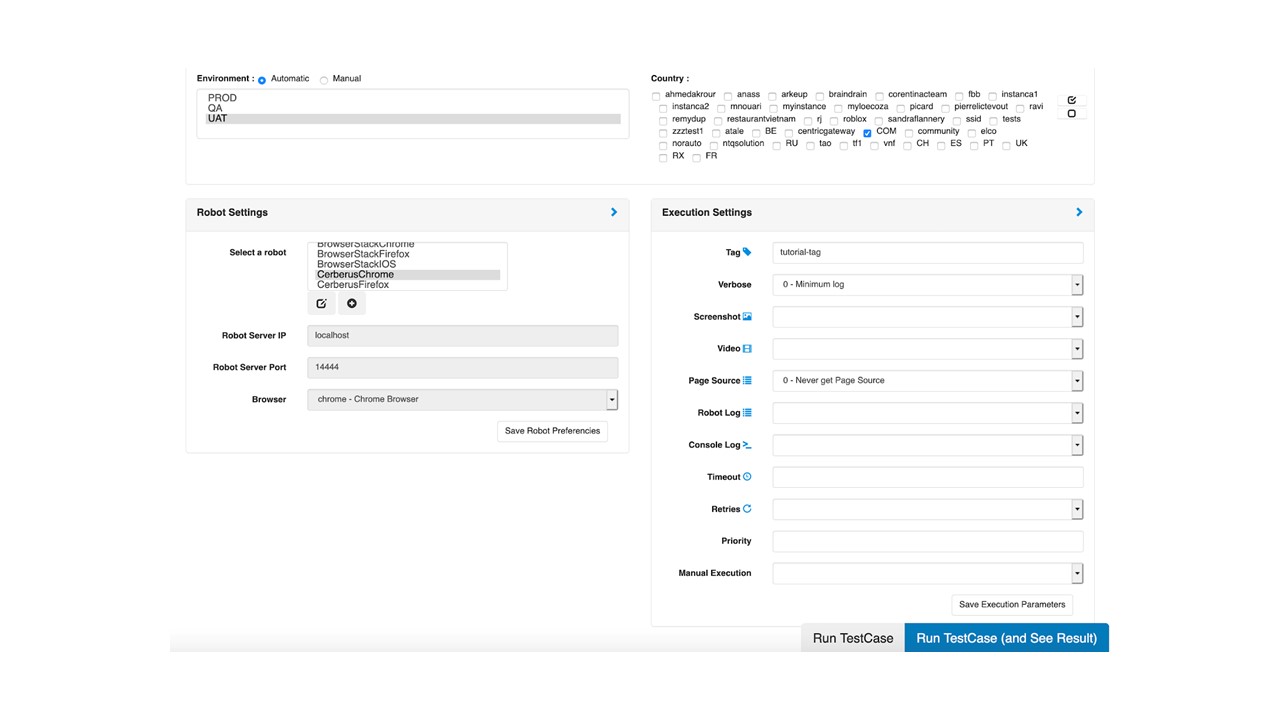
The test case is selected by default so we can define the execution parameters scrolling down on the page.
(click on figure to enlarge)
Confirm the following parameters :
Environment : Select one or more environments where the test case should be executed. In our case, pick “UAT”.
Country : Check one or more countries where you would like to run the test case. One more time, the country you select must be defined in the Application. Pick “COM”.
Robot Settings : Define the browser hub where the test case will be executed upon. Cross-browser Testing is supported if you select different browsers. We picked the “CerberusChrome”provided by the SaaS version. It is also possible to integrate with remote testing farms such as BrowserStack, Saucelabs among others.
Execution Settings : Mainly related to the traceability levels for the test, test infrastructure and queuing mechanisms (retry, priority, …). In our case we just specified the “Tag” with tutorial-tag.
Launch the test case and see it running live by clicking on “Run TestCase (and See Result)”.
4.2 Follow the Test Case Execution
You will see this page appearing after the test launch.

(click on figure to enlarge)
If you encounter an issue at this stage, we listed here the common themes :
Verify your Application definition, especially for the test environment and country. If you encounter a message related to those parameters this is probably the problem.
Verify your Test Case activated Environment. If you cannot launch your test in a Production environment you will need to explicitly activate it in the test case Header.
Verify your Selenium Server is correctly running and accessible on the ports you configured. You can manage them on the “Run/Robots” page.
Step 5 — Analyze The Test Case Report
It is now time to analyze the result of our test case execution! Once your test case is finished, the progress bar on the top will display your test status. The main ones are OK or KO, you can access more detailed information in the Cerberus Testing Documentation on Execution Status.
We described here the various tabs and their corresponding usage :
Steps : History of all your test case step, action and control performed, with executed data and links to the various screenshots for instance.
Properties : Find here all the properties used for your test. As we did not define one here, this tab is empty.
Execution Details : Traceability related to the test case execution including start and end times, status and ID. It is from this tab that you can open a ticket to an external platform if it is configured.
Environment : Describes the test case environment context.
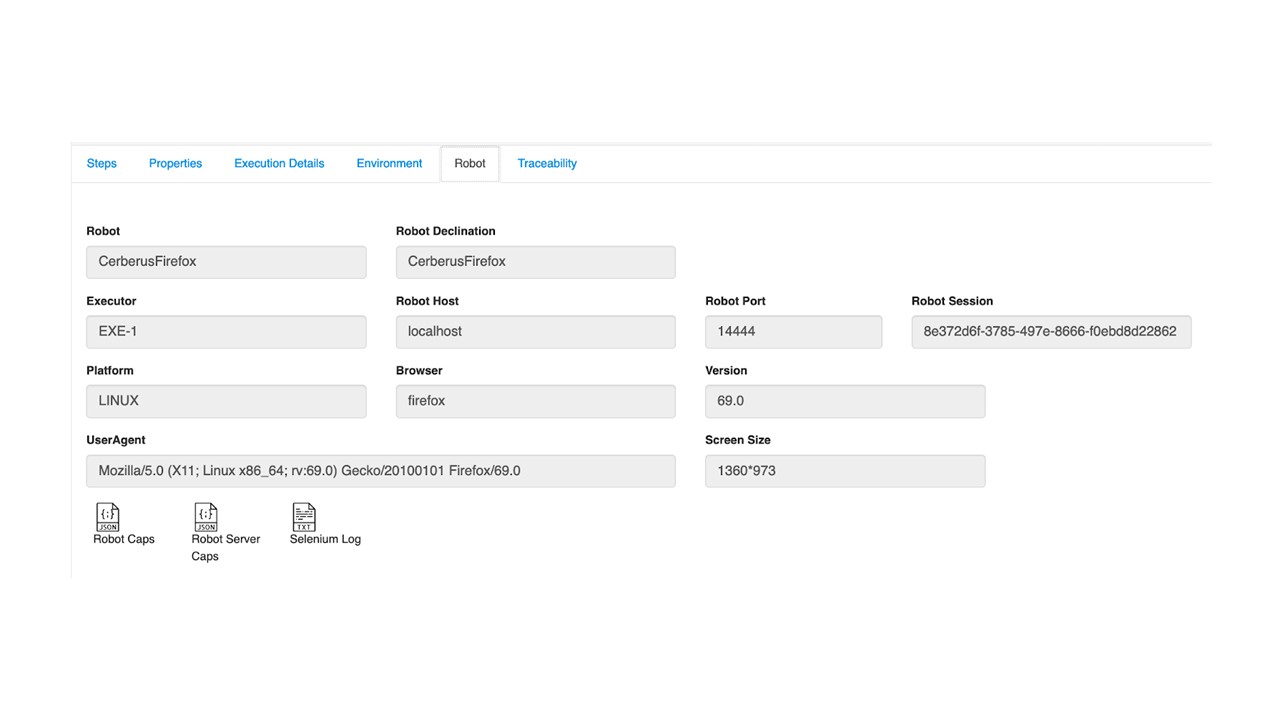
Robot : Traceability of your robot test infrastructure and browsers.
Traceability : Contains the changes made to the execution if any.
As an example, you can see below the robot context, settings and access to the different logs by clicking on the icons on the bottom part.
(click on figure to enlarge)
Conclusions & Next Steps for Your Web Testing Automation
By now you should have been able to run the example we described or even your own-defined test case. We hope this tutorial was helpful for you to understand the main stages involved in the test creation process for a new application with Cerberus Testing.
You can now expand your test coverage by creating reusable step libraries, duplicating or composing your test case and enriching them with specific properties. A good practice is to invest in your test design and modules in order to have fast, reliable and maintainable tests.
Scaling your test automation will be supported by the other capabilities offered by Cerberus Testing : test scheduling, integration with continuous integration and deployment (CI/CD), tags management, reporting and analytics capabilities.
More Information
Cerberus is a free open-source test automation framework, enabling you to implement cross-browser, mobile, APIs, databases, IoT, events, cloud testing. Iterate fast between your tests configuration, test execution and reporting being an integrated solution.
Follow-us on our social medias :
GitHub http://github.com/cerberustesting/cerberus-source
LinkedIn https://www.linkedin.com/company/cerberus-testing/
Twitter @CerberusTesting https://twitter.com/CerberusTesting
Website https://cerberus-testing.com
Click here to view the complete list of tools reviews
This article was published in December 2020